
CB460
Grade Control Display
Premium display for all machine types

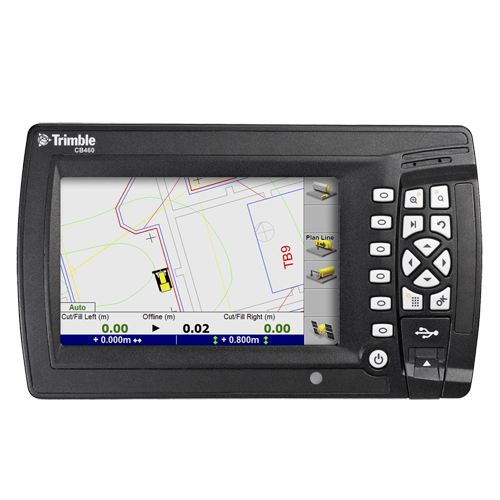
The Trimble CB460 Grade Control Display is a premium in-cab display designed for use with the Trimble GCS900 Grade Control System and CCS900 Compaction Control System, delivering accurate guidance for both 2D and 3D machine control applications.
The Trimble CB460 Control Box is the new premium display for the Trimble CCS900 Compaction Control System and the Trimble GCS900 Grade Control System portfolio.
The Trimble CB460 enhances the operator experience with a large 7” screen display of 3D profile information, grade guidance, and warnings – that is the same size as the older CB430 Control Box and 61% larger than the CB450 Control Box. While maintaining the same display size, the total size of the unit housing is smaller than the Trimble CB430 Control Box, allowing more flexibility with mounting in tight spaces.
Adjustable brightness capability and viewing angle accommodate different operational lighting conditions, while reducing operator fatigue and errors.

What Is the Trimble CB460?
The Trimble CB460 is a rugged, high-performance grade control display built for civil construction environments. It provides operators with real-time grade guidance, design data, and visual alerts while working on site, helping improve accuracy, productivity, and operator confidence.
The CB460 is compatible with a wide range of machine types including dozers, graders, excavators, and compactors when paired with Trimble machine control systems.
Trimble CB460 Specifications
| Specification | Details |
|---|---|
| Screen Size | 7-inch colour display |
| Compatibility | Trimble GCS900, CCS900 |
| Modes | 2D & 3D grade control |
| Storage | 3.7 GB internal |
| Data Transfer | USB |
| Lightbars | Internal + external support |
The CB460 uses icons for the main guidance softkeys instead of text strings . Softkeys are easier to read and provide a more modern interface for the user. Four integrated LED lightbars make it simple to monitor grade guidance information while also viewing conditions on the site. The CB460 can also be supplemented with external lightbars.
Create New Designs and Apply the Desired Coordinate System in the Field
Using the CB460, an operator can create new designs (level, slope or map) on the display and define what coordinate system to use with this new design, either the last used coordinate system, a coordinate system located on the displays storage disk or a new coordinate system based on the current location.
This in-field functionality offers several benefits, including:
- The ability to keep horizontal and vertical positions consistent at each site when using designs generated in the field.
- The ability to select which coordinate system to apply. Having the wrong coordinate system loaded even when creating new designs has the potential of giving bad guidance.
- The ability to create infield designs including infield coordinate system definition for use on sites that do not yet have a defined coordinate system
Data Transfer via USB memory stick
The CB460 utilizes internal memory for storing designs, machine files and machine production information. Using any USB memory stick, the user can easily load design files and firmware to the control box, download machine production files and load firmware to the control box. File transfer and archiving rules prevent operators from accidently deleting or overwriting files on the CB460.
USB data transfer also increases compatibility with Trimble Site Positioning System controllers which also have USB ports. This allows for easy data exchange between surveyors, grade checkers, site supervisors and machine operators – e.g. data can be synchronized to a site supervisor who can then rapidly deploy or retrieve data from a Trimble Tablet or TSC3 to or from the machine control system using a USB stick.
Flexible Upgrade Options Make it Easy to Order the Right Level of Functionality
Trimble CB460 Control Box can be configured for different functionality levels, based on the requirements of the customer. Trimble CB460 Control Box requires activation with option keys to enable desired 2D or 3D functionality.
In general, the following functionality levels are available:
- 2D indicate plus Automatics
- 3D Indicate (includes 2D indicate + Automatics)
- 3D Automatics (includes 3D indicate)
Trimble CB460 and CB450 Control Boxes Side by Side
Both the Trimble CB460 and CB450 Control Boxes offer precise guidance for all Trimble GCS900 Grade Control System machine types in 2D and 3D operations. Even though they look similar, each offers a set of distinct advantages to the user.

Key Features:
- Large, easy-to-read 7”screen
- Support for internal or external lightbars
- Adjustable brightness
- USB data port
- 3.7GB of internal disk space
- Ability to create new designs in the field and select which coordinate system to apply
- Flexible upgrade options that allow a user to purchase the exact functionality they need



Request a Quotation
Please complete the form below, and a SITECH SA representative will contact you to assist.
Frequently Asked Questions
What is the Trimble CB460 grade control display used for?
The Trimble CB460 grade control display is used to provide operators with real-time guidance when performing 2D and 3D grade control tasks on construction sites. It displays design data, grade information, warnings, and machine status when connected to Trimble GCS900 or CCS900 machine control systems, helping improve accuracy and productivity.
Which Trimble systems are compatible with the CB460?
The Trimble CB460 is compatible with the Trimble GCS900 Grade Control System and the Trimble CCS900 Compaction Control System. It can be used across multiple machine types, including dozers, graders, excavators, and compactors, making it a flexible solution for civil construction projects.
Does the Trimble CB460 support both 2D and 3D grade control?
Yes, the Trimble CB460 supports both 2D and 3D grade control functionality. Depending on the activated option keys, the display can be configured for 2D indication, 3D indication, or full 3D automatics, allowing contractors to select the level of functionality required for each project.
Can operators create designs directly on the Trimble CB460?
Yes, operators can create new designs directly on the Trimble CB460 in the field, including level, slope, and map-based designs. The display also allows users to select or define the correct coordinate system, ensuring accurate guidance even on sites without pre-defined designs.
Does SITECH SA provide support and training for the Trimble CB460?
Yes, SITECH SA provides local support, training, and technical assistance for the Trimble CB460 grade control display. This includes system setup, configuration, troubleshooting, and operator training to ensure reliable performance when used with Trimble machine control systems.